Ask three senior engineers how to refactor a gnarly module and you will get three different answers — and often you cannot tell which one is actually right until you have tried it. Influxx is built around a simple bet: instead of committing to one approach and finding out later it was wrong, run several at once. Fan a single prompt across multiple AI coding agents, each working in its own real, isolated git worktree checked out from the same starting commit, then compare what comes back and merge only the version that earns it. It is the single workflow Influxx users describe as "the reason I switched" more often than any other.
Why Picking One Agent and Hoping Is the Wrong Default
Most people evaluate AI coding agents the way they'd evaluate a single new hire: pick one, hand it a task, wait for the result, and hope. If the result is wrong, you explain what you actually meant and try again, or abandon that agent and start over with a different one. Either way, the cost of a wrong first guess is a full serial round trip — and on some of the most common engineering tasks, a wrong first guess isn't a remote possibility, it's close to a coin flip.
- Ambiguous refactors: "make this module more readable" or "simplify this component" has no single correct answer. Five competent engineers asked to do it would turn in five different diffs, and none of them would be obviously wrong.
- Performance work with more than one valid strategy: caching, an algorithmic rewrite, and a data-structure change can all fix the same benchmark, with genuinely different trade-offs in memory, complexity, and future maintainability.
- Bugs with more than one plausible root cause: without instrumenting the failure first, an agent has to guess where to start looking, and a wrong guess can burn an entire session before anyone realizes it was the wrong branch of investigation.
In all three cases, the honest answer to "which approach should I take" is "I don't know until I see it." Influxx's fan-out workflow is designed around that honesty: rather than forcing a decision before any code exists, it lets you defer the decision until you have several finished attempts sitting in front of you.
What Fanning Out Actually Does
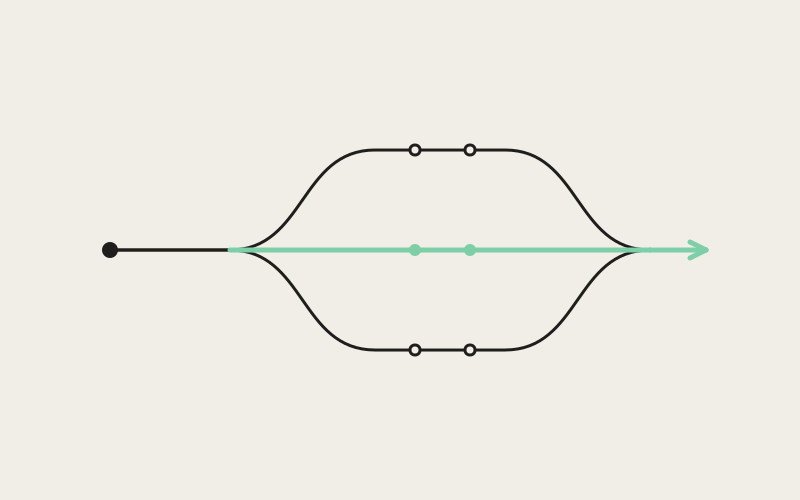
Mechanically, fanning out means taking one task and launching it across several agents at the same time — potentially different CLIs, potentially the same CLI run more than once — and giving each one its own complete, physically separate working copy of the repository, checked out at the identical starting commit. Every agent behaves as if it were the only one working on the problem, because as far as its own worktree is concerned, it is.
Real Directories, Not Simulated Views
This is the detail that makes the rest of the workflow possible: each worktree is a genuine, separate directory on disk, not a branch pointer or a filtered view into a shared checkout. None of the agents can see or interfere with another's in-progress edits, because there is no shared state between them to interfere with. One agent can delete a file, another can rewrite the same file from scratch, and a third can leave it untouched — all at once, all starting from the same commit, with zero risk of one attempt corrupting another.
"The whole workflow falls apart if two agents can quietly see each other's half-finished edits. That's not a subtle bug, that's the premise. So every worktree Influxx creates is a real checkout — its own directory, its own working tree, its own wiring back to the same repository. Nothing about it is simulated, which is exactly why the comparison at the end is trustworthy."
— Daniel Kwon, Staff Engineer, Agent Orchestration at ETAPX
Same CLI or Different CLIs — Your Choice
Because isolation is real rather than logical, it doesn't matter which agent occupies each worktree. You can run the same CLI several times against slightly different phrasings of a prompt to see how sensitive the result is to wording. You can run the identical prompt through the identical CLI several times to see how much the output varies run to run. Or, since Influxx's agent registry covers more than thirty CLIs, you can put a genuinely different tool in each worktree — Claude Code in one, Codex in another, Cursor in a third — and give all of them the exact same instruction on the exact same commit.
Comparing Real End States, Not Juggling One Checkout
Once the agents finish, comparing their output means comparing real, independently checked-out end states side by side: reading each agent's actual diff against the shared starting commit, and — because each worktree is a fully functional copy of the repository, not just a stashed set of changes — running each version's test suite independently if you want confidence beyond reading the diff. Nothing needs to be stashed, branch-switched, or reconstructed to look at any single attempt, because nothing was ever shared to begin with.
That matters because the alternative isn't actually available with a single shared checkout. If five attempts all lived in the same working directory, you could look at them only one at a time — checking out each branch in turn, running tests in turn, holding the previous result in your head while you look at the next one. Simultaneous comparison, the actual point of this workflow, would be impossible in the first place, not just inconvenient. Separate worktrees aren't a nicety layered on top of the fan-out workflow; they are the reason it can exist at all.
The Cross-Agent Bake-Off
Because the workflow is agent-agnostic, "fan out across five agents" doesn't have to mean five copies of your favorite CLI. It can mean five different opinions about the same problem. A developer comparing how Claude Code, Codex, and Cursor each independently approach the identical refactor, on the identical commit, isn't running a redundancy check — they're running a genuine bake-off, and the result is often more informative than any single agent's confidence in its own answer.
"I used to have a 'main' agent I trusted and would only reach for a second one if the first result felt off. Now, for anything where I'm not sure what the right approach even looks like, I just fan it out — usually Claude Code, Codex, and whatever else feels relevant — and let the diffs argue it out. I've had Cursor win on a refactor I was sure Claude Code would take, and the reverse the next week. There's no consistent pattern to it, which is exactly why running one agent and assuming it's the best choice never made sense to me."
— Devon Marsh, backend engineer and Influxx user at a fintech startup
Merging the Winner
Once one attempt is clearly ahead — better diff, cleaner tests, whatever the bar was for that task — merging it back means bringing just that one worktree's changes into your main line of work. The other worktrees, and the attempts inside them, simply get torn down. This is the moment where the safety of real isolation has to cut both ways: it is what let you compare freely, and it also means you're about to delete several complete, independent working directories that might still contain something worth keeping.
Influxx treats that moment as worth guarding deliberately. Before it will let you close out a worktree's terminal sessions, it verifies that worktree is actually clean — no uncommitted changes it doesn't already know about — rather than assuming that because you picked a different winner, everything else is automatically disposable.
"Losing a good idea because it happened to live in the worktree you didn't pick is a completely different failure mode than the agent just being wrong. One is an evaluation call; the other is us destroying your work by accident. We only have to earn trust on the second one. So before any worktree teardown, we check for a clean state, and if it isn't clean, we stop and tell you rather than closing the terminal anyway."
— Daniel Kwon, Staff Engineer, Agent Orchestration at ETAPX
That check is a small piece of friction on paper — one extra verification before a teardown completes — but it sits deliberately in the path precisely because the fan-out workflow all but guarantees you will be discarding several attempts on any given task. If even one of those discarded attempts had uncommitted work worth salvaging, an unchecked teardown would delete it permanently. The safety check exists so "delete the losing attempts" never quietly becomes "delete something I forgot I hadn't committed yet."
Keeping Track of Which Server Belongs to Which Attempt
Fan-out only stays practical if running several attempts at once doesn't create its own overhead — and the most common source of overhead, once you have three, four, or five worktrees active, is simply keeping track of which locally running dev server belongs to which attempt. Each worktree that starts its own dev server picks its own port, and after the second or third simultaneous run, "localhost:3001 versus localhost:3002 versus localhost:3004" stops being something you can reliably hold in your head.
Influxx handles this by watching what each worktree's terminal session actually prints. When a dev server starts up and announces its own URL and port — which almost every dev server does on launch — Influxx detects that output and surfaces the URL attached to the specific worktree that produced it. You don't have to remember which port you assigned to which attempt, because Influxx isn't guessing at a convention; it's reading the same startup message the tool already printed for you.
When the Fan-Out Workflow Actually Pays Off
Fan-out is not the right tool for every task. If you already know exactly what the change should look like, running it through one agent once is faster than fanning it out across several. The workflow earns its keep specifically on the tasks where "which approach is actually best" isn't obvious ahead of time — which, for most engineering work worth handing to an agent in the first place, is a larger share of tasks than people initially assume.
The core trade being made is wall-clock time against decision quality, and fan-out changes that trade in a specific way: because the agents run concurrently in their separate worktrees rather than one after another, evaluating several independent attempts costs close to the same wall-clock time as waiting on a single one — not several times as long. What you're spending instead is the up-front effort of choosing which agents to run, and the after-the-fact work of reading and comparing their output. For an ambiguous refactor, a performance problem with several valid fixes, or a bug with more than one plausible cause, that trade is usually a better deal than committing to one agent's first attempt and finding out serially, one iteration at a time, that it guessed wrong.
Frequently Asked Questions
How many agents can I fan out at once?
There's no artificial cap built into the workflow itself. The practical ceiling is set by your own machine: each worktree is a full checkout of the repository and each agent is a live running process, so disk space and how many CLIs you have configured and authenticated matter more than any limit Influxx imposes. Most tasks are well served by three to five parallel attempts; there's rarely a reason to go much higher unless you're specifically testing variance across many runs.
What actually happens to the worktrees I don't pick?
They get torn down, along with the attempts inside them — but not blindly. Influxx checks that a worktree is genuinely clean, with no uncommitted changes outstanding, before it will close out that worktree's terminal sessions. If something in a "losing" worktree hasn't been committed, teardown stops rather than silently discarding it.
Can I fan out using just one CLI instead of comparing different tools?
Yes. Fanning out the same CLI multiple times — against the same prompt, or against slightly different phrasings of it — is a fully supported pattern, and it's useful on its own for gauging how much an agent's output varies run to run. Mixing in other CLIs is optional, not required.
How do I keep multiple locally running dev servers straight while comparing attempts?
Influxx detects the URL and port each worktree's dev server prints on its own startup and surfaces it attached to that specific worktree, so you're not left cross-referencing a list of near-identical localhost addresses by hand.
Do I have to reconcile branches manually once I've picked a winner?
No. Bringing the winning worktree's changes into your main line of work is a first-class action inside Influxx, not a manual detour into a separate terminal to sort branches out by hand.
What if two attempts each got something right, and neither is a clean winner?
That's a legitimate outcome, and it's still a better problem to have than picking blind. Because both attempts exist as complete, independent diffs, you can read both closely enough to describe what each got right, then hand that back to a single agent as a far more specific follow-up prompt than the original ask — you're now iterating from two informed data points instead of one guess.
Fan-out doesn't make any individual agent smarter. What it changes is when you make the decision — instead of betting on one approach before any code exists and finding out serially whether you were right, you look at several finished attempts side by side and pick the one that actually earned it. For the tasks where the best approach genuinely isn't obvious up front, that's the difference between guessing well and not having to guess at all.